

Graphic by Pauline Valdez
Easybus PH, along with its partner bus lines, offers discounts for students, seniors, and PWDs, although the rates may vary between bus lines. To secure reserved seats and chosen discount, Easybus PH supports online payments through GCash, Maya, Visa, and Mastercard so that passengers have the flexibility to pick which payment method is convenient for them.
Discount in Reservation Fee
Easybus PH, along with its partner bus liners, offers discounts for passengers such as PWD, Senior, and Student discounts. However, these discounts may vary between bus lines. The discounted price is reflected in the payment summary upon paying.
Discounts can be availed upon entering the passenger’s details, right after you choose a bus seat. The discount section is right below where the passenger needs to put their name in.
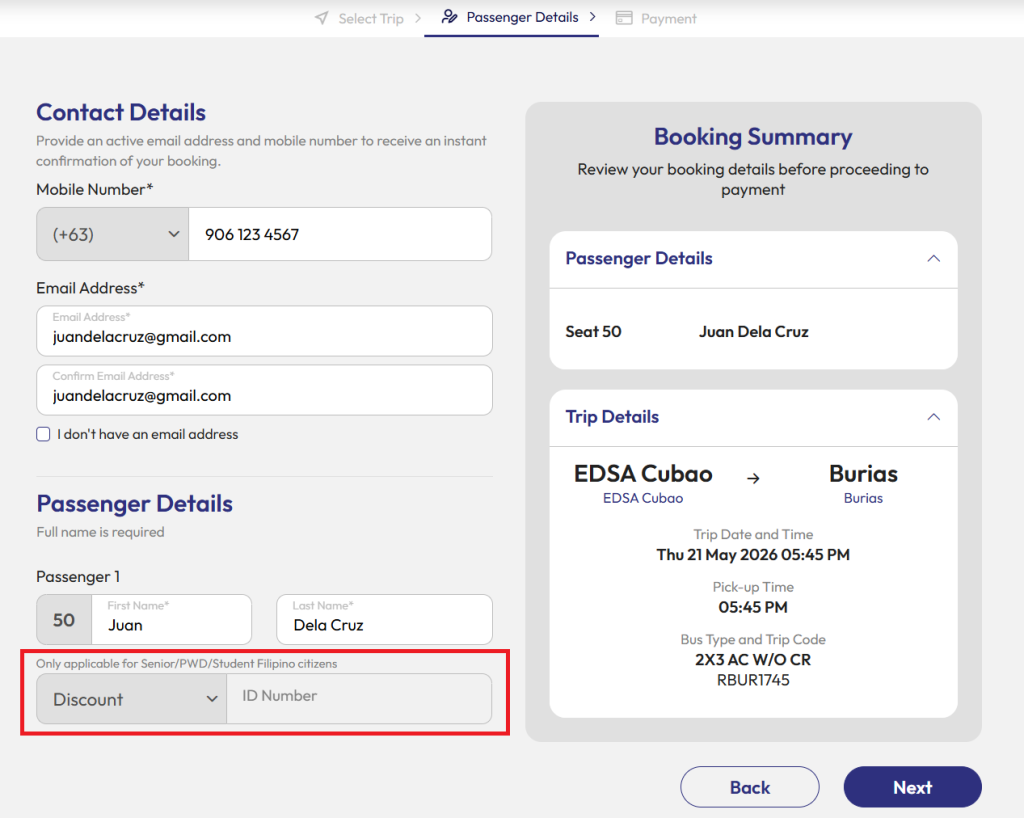
The discount section underneath the Passenger Details in PC view.
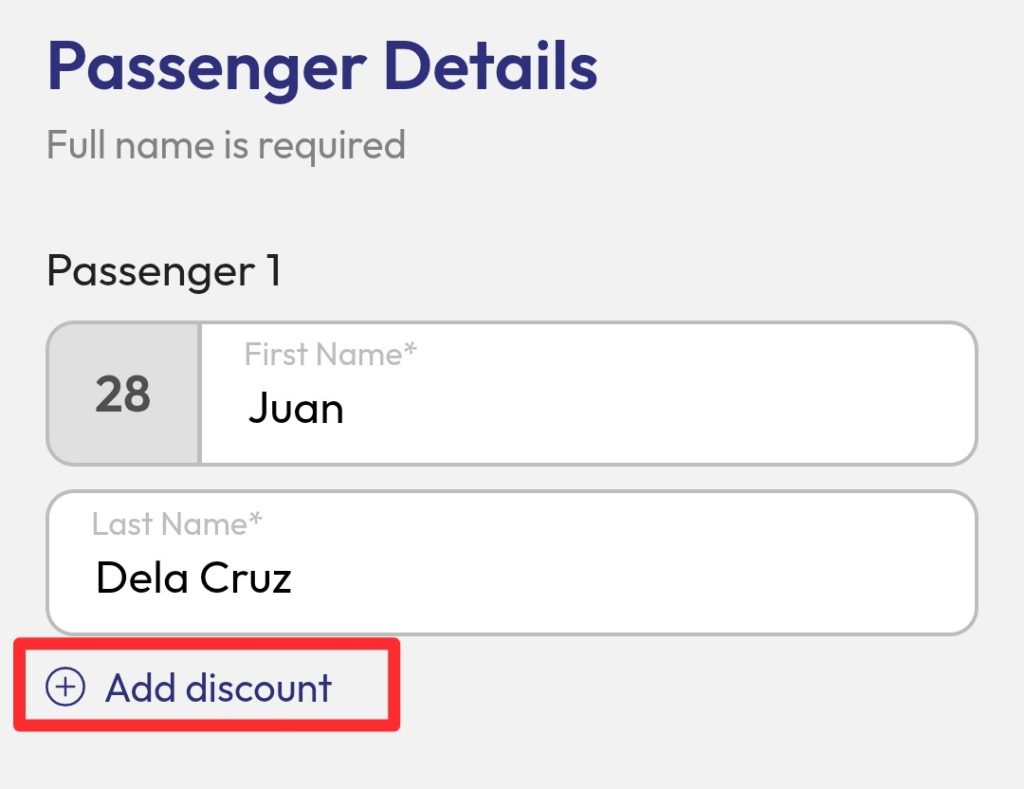
The discount section can be toggled to view in the mobile version when scrolling down.
Here are the ways to avail of any of the discounts:
PWD Discount
Upon reserving through the website, give the ID number of your PWD ID before payment.
On the day of travel, present a government-issued PWD ID before boarding the bus. Failure to comply will invalidate the discount with an additional penalty fee.
Senior Discount
Upon reserving through the website, give the ID number of your OSCA ID before payment.
On the day of travel, present a government-issued OSCA ID before boarding the bus. Failure to comply will invalidate the discount with an additional penalty fee.
Student Discount
Upon reserving through the website, give the ID number of your school ID before payment.
On the day of travel, present the official school ID, certificate of enrollment (COR), or any proof of enrollment before boarding the bus. Failure to comply will invalidate the discount with an additional penalty fee.
Student discount is only applicable during an academic year for preschool up to undergraduate college students.
Cashless payment for bus reservations
These are the step-by-step guides on how to pay using each payment method:
GCash
1. Choose GCash as your payment option.
2. Open your GCash app and scan the QR code that appears on your screen. Alternatively, you can save the QR code to your gallery, then upload it to your GCash through QR > Upload QR.
3. Press Pay. It is ideal to settle your payment within 5 minutes to secure your reservation. If using GCash Checkout, the payment should be settled within 15 minutes.
Maya
1. Choose Maya as your payment option.
2. Open your Maya app and scan the QR code that appears on your screen. Alternatively, you can save the QR code to your gallery, then upload it to your Maya through QR > Upload QR.
3. Press Send Payment. It is ideal to settle your payment within 5 minutes to secure your reservation.
Visa or Mastercard
1. Choose credit or debit as your payment option.
2. Fill in the required information in the form.
3. Press Complete Order. It is ideal to settle your payment within 30 minutes to secure your reservation.
To retrieve your ticket voucher, visit easybus.ph/book/retrieve. If there are any concerns regarding the payment or discounts, send us an email at support@easybus.ph.
Start booking your trip now at www.easybus.ph!